How the Internet Actually Works: A TPM's Guide
• public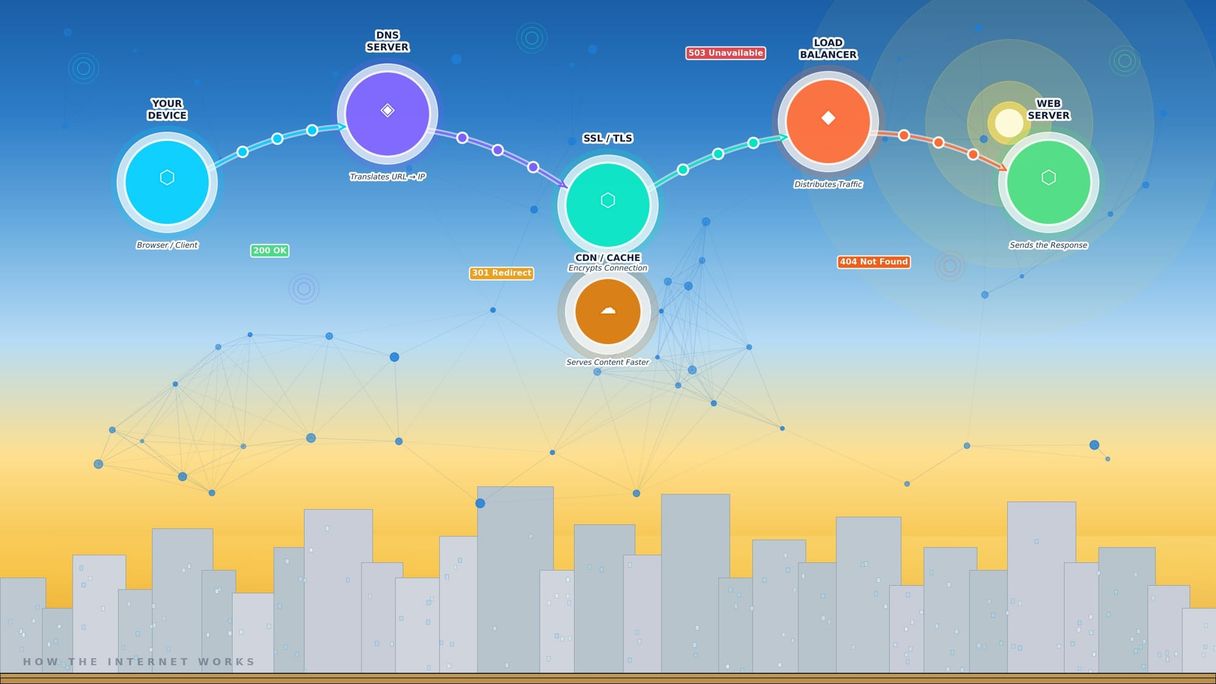
Technical fluency is part of the TPM job. Now it's time to start building it. We're going to start at the beginning: the internet itself.
You use it all day, every day. You've probably never stopped to think about what's actually happening when you type a URL into your browser. Most people don't need to. But TPMs do because the internet is the infrastructure that almost everything your engineering teams build runs on top of. Understanding how it works means you can ask better questions, spot risks earlier, and follow conversations that currently might fly over your head.
This isn't a computer science lecture. There's no math, no code, and no exam at the end. Just the concepts that actually show up in your work.
What the Internet Actually Is
Let's start with a definition that doesn't involve the word "cloud" :). The internet is a global network of computers that can communicate with each other using agreed-upon rules.
Those rules are called protocols. A protocol is just a shared language - a set of conventions that both sides of a conversation agree to follow so they can understand each other. Without protocols, a computer in London and a server in São Paulo would have no way to have a coherent conversation.
That's it. Everything else - websites, apps, APIs, streaming video, real-time collaboration - is built on top of that foundation.
The Client-Server Model
Most of the internet works on a model you've experienced thousands of times without knowing the name for it: client-server.
· The client is the thing making a request. Your laptop browser, your phone app, another service sending data; these are all clients.
· The server is the thing responding to that request. It's a computer somewhere (often many computers) that has something the client wants: a webpage, data, an image, the result of a calculation.
When you open a news website, your browser (client) sends a request to the news site's servers. The server looks up what you asked for and sends it back. Your browser reads the response and displays the page. The whole thing happens in under a second.
This request-response cycle is the heartbeat of the modern internet. Every API call, every data fetch, every time a mobile app pulls updated content—it's all a variation on this same pattern.
Why this matters for a TPM: When engineers talk about latency (the time it takes for a request to get a response), reliability (what percentage of requests succeed), or timeout errors (when a request takes too long and gives up), they're talking about problems in this client-server cycle. You'll hear about these things in incident reviews, in design discussions, and in post-mortems. Understanding the basic model means you won't be starting from zero.
What Happens When You Type a URL
This is the classic computer science interview question, but it's also genuinely useful knowledge. Walk through it once slowly, and you'll understand more about how the internet works than most non-technical people ever will.
Let's say you type www.google.com into your browser and hit enter.
Step 1: DNS Lookup
Before your browser can do anything, it needs to find the server that hosts Google. It only knows the name "google.com" - not the actual address where Google's servers live. That's where DNS (Domain Name System) comes in.
Think of DNS as the internet's phone book. You look up a name (google.com), and DNS returns a number (the IP address). An IP address is the actual numeric identifier of a server on the internet. Something like 142.250.80.46.
Your browser asks a DNS server: "Where is google.com?" The DNS server responds with an IP address. Now your browser knows where to go.
Why this matters for a TPM: DNS failures are a real incident type. If a company's DNS configuration breaks - maybe during a migration, a provider outage, or a misconfiguration - users can't reach the site even if the underlying servers are perfectly healthy. When engineers talk about a "DNS propagation delay," they mean that a change to the phone book takes time to spread across the internet. That has implications for migrations and launch timelines.
Step 2: TCP Connection
Now that your browser knows the IP address, it needs to establish a connection. It does this using TCP (Transmission Control Protocol), one of the foundational protocols of the internet.
Think of TCP as the handshake before a conversation. Your browser says "I want to talk." The server says "I'm ready." Your browser says "Great, let's go." This three-step handshake ensures both sides are ready before any data is exchanged.
Step 3: HTTPS and the TLS Handshake
If the site uses HTTPS (and every serious website does), there's an additional step: establishing an encrypted connection using TLS (Transport Layer Security).
HTTPS is the secure version of HTTP. The "S" stands for secure. The TLS handshake is how the browser and server agree on encryption—so that everything they send back and forth is unreadable to anyone trying to intercept it.
You've seen the lock icon in your browser's address bar. That lock means TLS is active and the connection is encrypted. When that lock is missing, the connection is unencrypted—and anything sent over it can be read by someone in the middle.
Why this matters for a TPM: SSL/TLS certificates expire. When they do, browsers start showing scary security warnings, and users stop trusting the site. Certificate expiration is a surprisingly common incident cause—and it's entirely preventable. If your team manages certificates manually, you should know when they expire and have a process to renew them. This belongs on your program radar.
Step 4: The HTTP Request
Now the browser sends an HTTP request to Google's server. HTTP (HyperText Transfer Protocol) is the language browsers and web servers use to communicate.
The request says something like: "GET the homepage. Here's my browser type, the language I prefer, and any cookies I have from previous visits."
An HTTP request has three main parts:
· Method: What you want to do (GET = retrieve something, POST = send data, PUT = update something, DELETE = remove something)
· Headers: Metadata about the request (browser type, authentication tokens, content format)
· Body: The data being sent (only relevant for POST and PUT requests)
Step 5: The Server Response
Google's servers receive your request, process it, and send back an HTTP response. The response includes:
· Status code: A three-digit number that tells you what happened
· 200 OK — Success. Here's what you asked for.
· 301 Moved Permanently — This URL has moved. Go here instead.
· 404 Not Found — I can't find what you're looking for.
· 500 Internal Server Error — Something went wrong on my end.
· 503 Service Unavailable — I'm too busy or down right now. Try again.
· Headers: Metadata about the response (content type, cache instructions, security policies)
· Body: The actual content—in this case, HTML that your browser will render as a webpage
Why this matters for a TPM: Status codes show up in incident reports, dashboards, and error monitoring. A spike in 500 errors means your service is failing server-side. A spike in 404 errors might mean a deployment broke links. Understanding what these codes mean lets you follow the technical narrative in an incident without needing a translator.
Step 6: Rendering the Page
Your browser reads the HTML in the response body and starts rendering the page. It discovers that it also needs to fetch CSS files (for styling), JavaScript files (for interactivity), and images. It fires off additional requests for all of them.
In the time it takes you to blink, dozens of requests have gone back and forth, and a complete webpage is sitting on your screen.
The Infrastructure Behind the Scenes
The six steps above describe the logical flow. But in production—at the scale that real tech companies operate—there are several layers of infrastructure that make it all faster and more reliable.
Load Balancers
Google doesn't have one server. It has thousands. A load balancer sits in front of them and distributes incoming requests across all available servers. If one server is overloaded, the load balancer routes traffic elsewhere. If one server fails, the load balancer stops sending it traffic.
Load balancers are how companies achieve horizontal scaling—handling more traffic by adding more servers rather than making one server bigger.
CDNs (Content Delivery Networks)
A CDN is a globally distributed network of servers that cache content close to users. If you're in Lagos watching a video hosted by a company in California, a CDN might serve that video from a server in Johannesburg instead—reducing the distance the data has to travel and making playback faster.
CDNs handle a huge fraction of global internet traffic. Companies like Cloudflare, Akamai, and AWS CloudFront are major CDN providers. If your team says "we're serving static assets through the CDN," they mean images, JavaScript, and CSS files are being cached and delivered this way.
Caches
Caches are temporary storage layers that hold frequently requested data close to where it's needed—so the server doesn't have to compute or fetch it every time.
Your browser has a cache. There are caches inside the server infrastructure. There are database-level caches. The purpose is always the same: serve the common case faster by not repeating work you've already done.
Cache invalidation—knowing when to clear a cache so users get fresh data—is famously tricky. When engineers say "it might be a caching issue," this is what they mean.
Protocols You'll Hear About
Beyond HTTP, a few other protocols come up regularly in TPM contexts:
· WebSockets: HTTP is request-response—the client asks, the server answers. WebSockets enable a persistent, two-way connection. This is how real-time apps work: live chat, collaborative editing, stock tickers. If your team is building "real-time" anything, they're probably using WebSockets or a similar approach.
· gRPC: A modern protocol used for internal service-to-service communication, especially in microservices architectures. Faster and more structured than REST over HTTP. Engineers will mention it when discussing how services talk to each other.
· TCP vs UDP: TCP is reliable—it checks that every packet arrived. UDP is fast—it doesn't check, which means some packets can be lost. Live video and gaming use UDP because a dropped frame is better than a delay. Everything else that can't afford data loss uses TCP.
Putting This to Work as a TPM
You don't need to memorize protocols. What you need is enough mental model to participate in technical conversations without losing the thread.
Here's what this knowledge looks like in practice:
In design reviews: When engineers are discussing the request flow for a new feature, you can follow the architecture. You understand what a client is, what a server is, why caching might be relevant, and what happens if the latency on this request is higher than expected.
In incident reviews: When the team is debugging why a service was down, you understand what a 503 means, why DNS propagation takes time, and what a load balancer failure looks like.
In dependency tracking: When an engineer says "our service depends on a third-party API," you know that means latency and reliability are now partially outside your control. You can ask: what happens to our service if that API is slow? If it's unavailable?
In risk identification: You know that certificate expiration, DNS misconfigurations, and cache invalidation issues are real failure modes. You can ask whether they're on the radar.
What Comes Next
Next week, we're going to look at the most important non-technical skill a TPM can have: stakeholder management. But in two weeks, we'll come back to the technical track and tackle APIs—the interfaces that connect services to each other. APIs build directly on everything you've just learned about HTTP requests and responses.
Key Takeaways
1. The internet is a network of computers communicating via shared rules (protocols). HTTP, DNS, and TCP are the foundational ones every TPM should know by name and rough purpose.
2. The client-server model — one side requests, the other responds — is the pattern behind almost every interaction in the systems you manage. Latency, reliability, and errors all live in this cycle.
3. When you type a URL, your browser does a DNS lookup (translating the name to an address), establishes an encrypted HTTPS connection, sends an HTTP request, and receives a response. Every step is a potential failure point.
4. HTTP status codes (200, 404, 500, 503) tell you what happened. They appear in incident reports, error dashboards, and post-mortems. Knowing them fluently makes you a more effective incident participant.
5. Load balancers, CDNs, and caches are the infrastructure that makes modern apps fast and reliable. When engineers talk about scaling or performance, these are usually part of the conversation.
Next week: Stakeholder Management—the #1 skill that separates good TPMs from great ones. Then we'll be back on the technical track with APIs in Week 8.
Related Reading:
· Do You Need to Know How to Code to Be a TPM
· [APIs Explained: How Software Talks to Software](#) (Coming in Week 8)
· [Stakeholder Management: The #1 Skill Every TPM Needs](#) (Next Week)